

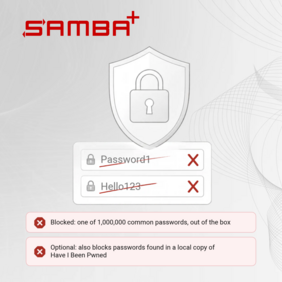
SAMBA+ now includes a Password Blacklist Check. Before a domain controller accepts a new password, it compares it against lists of known-weak and breached passwords, and optionally against a local copy of the Have I Been Pwned database. The check is included in the current packages from SAMBA+ 4.23 onwards and is part of every SAMBA+ subscription.
The complexity rules of Active Directory let Password1 through. Hello123 too. Those are among the first passwords an attacker tries, and the first ones a penetration test looks for. Some organizations try to catch such passwords in a self-service portal. That covers only the changes made through the portal; anyone who changes a password on a Windows client or with administration tools bypasses it. The Password Blacklist Check runs on the domain controller, which processes every password change, whichever way it comes in. It is the blocklist check that NIST SP 800-63B-4 requires for every new or changed password. For organizations that have dropped the 90-day password change, as NIST and the BSI recommend, this check keeps weak and breached passwords out from the start. Together with the default complexity rules, the bundled list blocks the one million most commonly used passwords; administrators can add their own, from company names to the local football club.
For a broader check, SAMBA+ compares passwords against the Have I Been Pwned collection (passwords from publicly known breaches). The lookup runs locally on the domain controller. No password and no hash leaves the server. On Windows domains, Microsoft offers banned-password checks only as part of its cloud: Entra Password Protection requires an Entra tenant with P1 or P2 licensing, a forest registered with that tenant and a proxy server with internet access to Microsoft. SAMBA+ needs none of these; the check is part of the package.
Developed and maintained by SerNet
The Password Blacklist Check was developed at SerNet for SAMBA+ and arrives with the regular package updates, for vendors who build their products on SAMBA+ as well. The subscriptions for SAMBA+ fund the ongoing development work for Samba at SerNet, and with it the development on upstream Samba.
Availability
The check is available for SAMBA+ in the AD domain controller role, on Linux. How to enable it, add custom lists and set up the local Have I Been Pwned copy is described in the HowTo: Harden SAMBA+.
Questions about the Password Blacklist Check, help with the rollout, an audit requirement to meet, or a product built on SAMBA+? SerNet supports you through support budgets and service level agreements. Write to sales@samba.plus or use our contact form.


